
JavaScript disabled

This website requires JavaScript to function properly.
Please enable it in your browser and reload the page.

Download Cubase | MaGeSY ®™⭐
🎵 MaGeSY® R-EVOLUTiON™⭐⭐⭐

  • Cubase 9 Windows and Taskbars TUTORiAL
    August 7th, 2018 ⚡
    Categories:

    image

    Cubase 9 Windows & Taskbars

    FANTASTiC | 07 August 2018 | 928 MB

    This course will be useful for those who are just getting started with recording or even moving into Cubase from another piece of recording software. By the end of this course, you’ll have a practical guide to improve your working process by learning all about the Project Window, the Lower Zone, the Media Bay and the MixConsole. You’ll be able to keep a project clean and your hard drive uncluttered by understanding how Cubase handles file storage from within the Project Pool. You’ll learn how to set up a project from scratch making sure all of Cubase configurations are ready to work. The ideal individual for this course is somebody who wants to write and produce his own music, whether you are an absolute beginner who’s never produced music before or a seasoned user who would like to take his working process to the next level.


    Viewed 5811 By Music Producers & DJ´s.

  • image

    Cubase 9 Installation & Configuration

    FANTASTiC | 07 August 2018 | 523 MB

    This course will be useful for those who are just getting started with recording or even moving into Cubase from another piece of recording software. I’ll be first walking you through the installation, authorization and registration process moving into setting up your external audio hardware to work within Cubase. You’ll learn how to set up a project from scratch making sure all of Cubase configurations are ready to work. By the end of this course, you’ll be able to look at a clean project and have the confidence to start working. The ideal individual for this course is somebody who wants to write and produce his own music, whether you are an absolute beginner who’s never produced music before or a seasoned user who would like to take his working process to the next level.


    Viewed 4708 By Music Producers & DJ´s.


  • Cubase Working Outside of the Box TUTORiAL
    July 28th, 2018 ⚡
    Categories:

    image

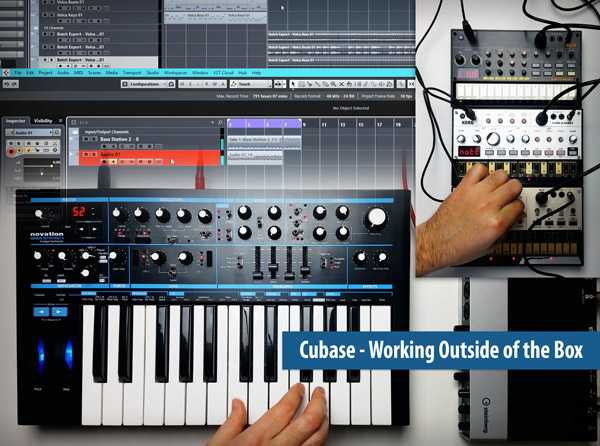
    Cubase Working Outside of the Box

    FANTASTiC | 28 July 2018 | 231 MB

    Studio master brings you the video tutorials you’ve always wanted when needing to hook up external synths to your Cubase DAW system! Get all the basic questions answered as well as info on more advanced topics and solutions. Designed for the beginner to working with external synths in Cubase, Paul starts at the beginning showing you how to save your own input configuration to make the most of your available inputs, and set yourself up for the first device. Then it’s onto making your first connections and recording a single synth, layering parts as you go to create your full production, using only a single external synth. You’ll also get tips on ways to monitor your external synth, and how to get the most out of just one device. Still using only one synth, Paul now reveals how to capture and print MIDI data to audio, and talks about organizational approaches to handling multiple pairs of MIDI and audio tracks, as well as how to go back and make edits to your overdubs. For the rest of the video tutorials you’ll explore more advanced topics such as configuring your external synths to function like VST Instrument Tracks, using MIDI Clock, MIDI CC and Program Changes, MIDI Thru, Expanding Ports and more!


    Viewed 6655 By Music Producers & DJ´s.


  • image

    How To Use Cubase 9.5 Level 2

    SYNTHiC4TE | July 08 2018 | 2.84 GB

    ..:: Beginner Level 2 ::..

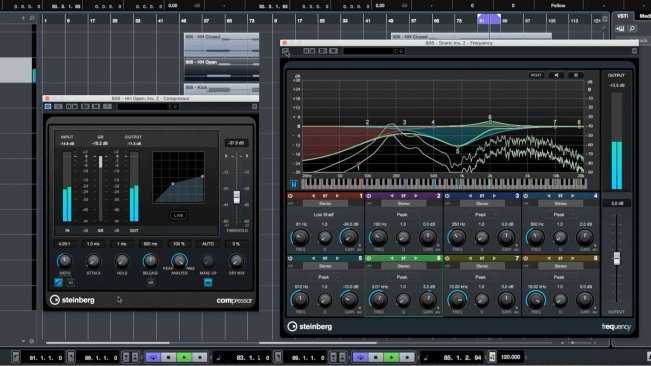
    Over the next 13 videos, we welcome back Cubase sensei Protoculture, as he takes you to the next level on this masterclass journey. If you are a complete beginner or even a seasoned pro, this course has something for everyone. How To Use Cubase 9.5 Level 2, continues on from where Level 1 finished off. It is quite literary NEXT LEVEL! With loads of useful knowledge for producers starting out, we begin by checking out how to route busses and use send/return fx, take a closer look at dynamic processing, compression and sidechain compression before moving on to stereo widening, offline processing, and render in place. Protoculture then checks out a few useful stock plugins along with VCA faders and then wraps up by moving the project so it can be mastered efficiently and utilising Cubase’s powerful Frequency EQ before exporting.


    Viewed 7873 By Music Producers & DJ´s.


  • image

    Mixing Audio with Cubase Part 1 TUTORiAL

    FANTASTiC | 03 July 2018 | 1.14 GB

    EQ & Compression

    This course is designed to make the processing of mixing your track feel more like music and less like engineering. You’ll learn how EQ and compression work together to help you make the right musical choices for each track in your mix. You’ll learn what to listen for when using a compressor.  These stems can be used in an DAW (ProTools, Cubase, Ableton, Logic, etc.). The lessons in this course are presented with Cubase, but the main focus is EQ and Compression which are universal topics that apply to any DAW. Follow along with this walkthrough-style course to learn how the technicalities of mixing with EQ and Compression. With these skills, you’ll be able to stay focused on your music without having to compromise on a half-baked final mix.


    Viewed 5391 By Music Producers & DJ´s.


  • image

    How To Use Cubase 9.5 TUTORiAL

    SYNTHiC4TE | May 25 2018 | 2.47 GB

    ..:: Beginner Level 1 ::..

    Want to get to grips with Cubase 9.5? Maybe you’ve recently started out using the software or are considering changing your current DAW? Well over the next 17 videos, Nate Raubenheimer aka Protoculture will take you through the key areas of Steinberg’s Cubase. This is a Beginner Level 1 course where Nate will show you how to get up and running with the software, from opening it for the first time to creating your first beats, sounds, and finishing your first track – all with his expert workflow tips so you can get the best start possible. First up we take a look at the audio setup and user interface of Cubase 9.5 showing you all the key areas you’ll need to know, then we bring in some drums to create the groove. Next up we add some synth, bass sounds and transition effects, and lastly we finish off by arranging the track create movement and tension with automation, add some arpeggiated pads, mix the track down, and then export the track so it can be played anywhere.


    Viewed 5876 By Music Producers & DJ´s.


  • image

    How to Make Electronic Music with Cubase

    P2P | 13 December 2015 | 909 MB

    Learn how to create an electronic track from A to Z. A comprehensive guide to using Cubase for your Productions! Learn How to Make Electronic Music with Cubase from A to Z. Finally a comprehensive guide to using Steinberg Cubase DAW for your Electronic Music productions. If you are looking for a complete electronic music production course, your are in the right place! Welcome to this course dedicated to Steinberg Cubase Pro, one of the most famous Digital Audio Workstation used in the music production filed. During the course, we will create together a Classic House Song from scratch, that is the best way to learn all the main functions and operations in Cubase.


    Viewed 5573 By Music Producers & DJ´s.


MaGeSY TeleGram Subscribe & Stay up to date with all the Posts that are published in MaGeSY MaGeSY Podcast: Subscribe & Stay up to date with all the Audio Posts that are published in MaGeSY MaGeSY Instagram Official MaGeSY-Youtube Official MaGeSY-X Official MaGeSY-Facebook Official Social Networks:MaGeSY-Pinterest Official MaGeSY-WhatsApp Channel Official  MaGeSY-TiK-TOK Channel Official

Total Posts: ❨ 🎵➡174 ❩ | Paged: ➡ 15


ಮ್ಯಾಜೆಸ್ಯ್