🎵 MaGeSY® R-EVOLUTiON™⭐⭐⭐

  • image

    Getting Creative with Your DAW

    SYNTHiC4TE | Oct 07 2019 | 445 MB

    Cool “getting creative videos” when using your DAW! Learn all kinds of ways to make interesting new sounds and effects with any DAW. These creative DAW tutorials are perfect for those just starting out using any DAW, as well as for more intermediate DAW users. Gary welcomes you and then starts with a video on how to turn your drum beat into a bass part, which is a great production trick for getting a tight rhythm section groove. He then shows you how to use sequencers and arpeggiators to compose melody lines and beats that you may not ever have thought of. Re-pitching your audio is then shown and you’ll see how this is great for enhancing and alternating otherwise plain sounds, into ones with a lot of character. Moving on, you’ll see how to use MIDI chord effects & chord apps to help you come up with interesting new chord progressions, create stutter gated audio effects, use reverse effects for transitions, apply extreme time stretching to your audio for other worldly sounds, resampling audio through a sampler for more effect options, and create filtered telephone fx and robotic synth voices with pitch correction tools.


    Viewed 6699 By Music Producers & DJ´s.

  • How To Use OB-Xa V TUTORiAL
    June 5th, 2020 ⚡
    Categories:

    How To Use OB-Xa V TUTORiAL

    How To Use OB-Xa V TUTORiAL

    HiDERA | 5 June 2020 | 1.7 GB

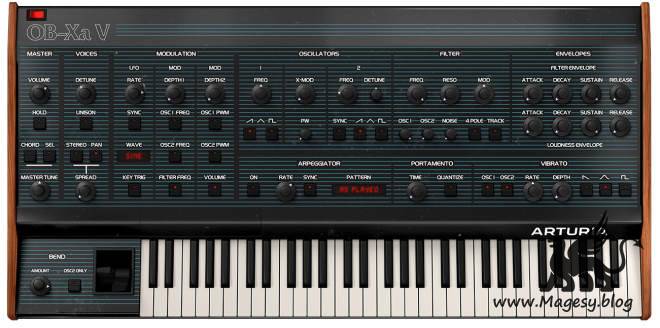
    It’s time for another classic synth emulation ‘How To Use’ course so guess who’s back? Yup, you’ve guessed it, synth royalty is here to show you the ropes and this time he’s checking out the awesome OB-Xa V! Even if you’ve never heard of the OB-Xa you just have to say ‘Jump’ by Van Halen and you’ll immediately know what it sounds like and why it’s an 80’s icon. Definitely a keyboard player’s rather than a nerd’s synth, the OB-Xa is relatively easy to navigate and not as complicated as some of Arturia’s other emulations but even so, it packs a hell of a punch and is regarded as an obvious rival to the mighty Prophet 5. It’s a great entry for those wanting to get into the world of synthesis but there’s still plenty to get through if you want to truly master this synth and Matt’s here to guide you in this easy-to-follow and detailed course.


    Viewed 5735 By Music Producers & DJ´s.


  • Audio Mixing Master Class TUTORiAL
    June 5th, 2020 ⚡
    Categories:

    Audio Mixing Master Class TUTORiAL

    Audio Mixing Master Class TUTORiAL

    TEAM BiFiSO | 21.12.2018 | 2.41 GB

    This is updated Full Tutorial (Update 18.12.2018)

    Get a master class in audio mixing from one of the music industry’s most admired teachers. Built around hands-on mixing exercises designed to show you how to listen and work like a music pro, this weekly series reveals the tips, tricks, and secrets to all the different facets of mixing, including instrument and vocal balance, panning, compression, EQ, reverb, delay, and making your mix as interesting as possible. See how the pros handle the critical balance between the bass and drums. Learn where, when, why, and how EQ should be used on virtually any instrument. Become proficient in tailoring just the right effect for each particular mixing situation. And master the key to fat and punchy sounding mixes: compression. Tune in every Thursday for a new tip!


    Viewed 6917 By Music Producers & DJ´s.


  • Building a DAW Mix Template TUTORiAL-SYNTHiC4TE

    Building a DAW Mix Template TUTORiAL

    SYNTHiC4TE | Nov 14 2016 | 1.31 GB

    Studio wiz brings you in-depth video tutorials focused on building an awesome mixing template for your DAW. See how professionals get a mix done with this time-saving practice that allows you to concentrate on the mix! From setup to routing, reverbs to delays, compression routing techniques, using mix buses and more, Michael breaks down the art of making a great mix template and using it for your productions. See the individual tutorial descriptions below for more info. If you mix music or any kind of recordings, a mix template can drastically increase your productivity and allow you to be more creative. Watch “Building a DAW Mix Template” today!


    Viewed 5655 By Music Producers & DJ´s.


  • image

    The New Music Biz TUTORiAL

    FANTASTiC | 13 September 2019 | 4.14 GB

    …::: Bands, Brands, Managers, and Tours :::…

    If you want to make a name for yourself and make an impact in the music industry – you have options. Kevin is the founder of the Vans Warped Tour, Rockstar Mayhem Fest and the catalyst behind an impressive range of successful projects and artists. In this class he’ll introduce you to your (many, many) options for building a career in the modern music industry. Kevin will talk to musicians about getting on festival tours and about operations jobs for people who are looking to get in on the business side. You’ll learn how to build and maintain a professional brand that will open doors for you and help connect you to the right people and expanding your opportunities in a constantly changing environment. If you are serious about setting yourself up for a lifetime career in music you’ll want to watch this course. Kevin will set you on track for developing and sustaining a career that lasts.


    Viewed 4782 By Music Producers & DJ´s.


  • image

    Audacity: The Video Manual

    SYNTHiC4TE | Sept 29 2019 | 319 MB

    Audacity is a powerful open-source app for recording and editing audio… and best of all it’s free! Let our audio expert guide you through all the features of this popular audio editor for macOS, Windows and Linux. Whether you’re looking to record a podcast, mix music, or master audio, you can’t go wrong with the free audio editor Audacity… as long as you know how to use it well! The software is quite different from other audio application, so there’s a bit of a learning curve, but don’t fret! Educator and audio expert is here with this video manual to show you exactly how to use Audacity. Editing in Audacity needs a different approach than what you may be used to. That’s why Joe starts by explaining the differences between destructive and non-destructive editing, and how this will affect your workflow in Audacity. Next, he explains how to set up Audacity’s preferences and organize your projects.


    Viewed 3953 By Music Producers & DJ´s.


  • How to Produce Electronic Music TUTORiAL
    May 25th, 2020 ⚡
    Categories:

    How to Produce Electronic Music TUTORiAL

    How to Produce Electronic Music

    P2P | 25 May 2020 | 1.25 GB

    The Basics of FL Studio

    In this course – which has been specially revamped for 2020 and designed for the latest version of FL Studio 20 – we will be showing you the very basics of FL Studio, how to use the interface, the windows and what the various plugins and effects do. Want to produce dance music, but struggling to figure out your mixer’s from your mixdowns? With this course, you will be fully on your way to producing club banger smash hits with this brilliant course! The first 20 minutes of this course are absolutely free! Preview what gets taught with absolutely no risk! This course has been specially for those who have never used FL Studio before, or who have downloaded it and installed it only to open the program and become totally confused by what they see. When they look on YouTube, they get confused by the myriad of tutorials available and have no idea where to begin.


    Viewed 5453 By Music Producers & DJ´s.


MaGeSY TeleGram Subscribe & Stay up to date with all the Posts that are published in MaGeSY MaGeSY Podcast: Subscribe & Stay up to date with all the Audio Posts that are published in MaGeSY MaGeSY Instagram Official MaGeSY-Youtube Official MaGeSY-X Official MaGeSY-Facebook Official MaGeSY-Pinterest Official MaGeSY-WhatsApp Channel Official

With Adblocker the page loads slower & avoid enhanced new search


ಮ್ಯಾಜೆಸ್ಯ್