JavaScript disabled

This website requires JavaScript to function properly.
Please enable it in your browser and reload the page.

Download Mapping | MaGeSY ®™⭐
🎵 MaGeSY® R-EVOLUTiON™⭐⭐⭐

  • MadMapper v6.0.10 WiN
    April 16th, 2026 ⚡

    MadMapper v6.0.10 WiN-MaGeSY

    MadMapper v6.0.10 WiN

    P2P | 16 April 2026 | 250 MB

    The Most Advanced Application for Video and LED Mapping

    MadMapper is a collaborative software project between the french installation studio 1024 architecture and the swiss software makers GarageCube. With more than 10 years experience in the field, we are devoted to bringing you the best tool for your artistic needs.


    Viewed 11008 By Music Producers & DJ´s.


  • Maschine MK3 Mapping For Traktor-DECiBEL

    Maschine MK3 Mapping For Traktor

    Team DECiBEL | 29 December 2022 | 7.8MB

    (incl CABD Layout)

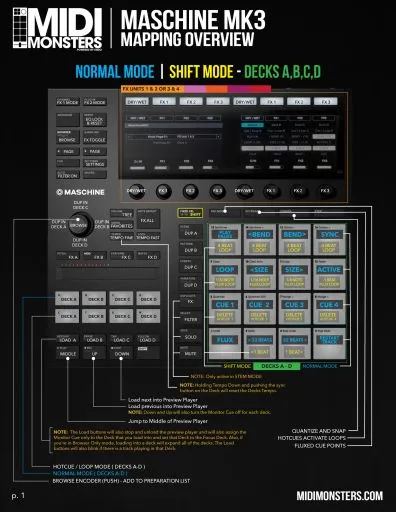
    With the ENDO Maschine MK3 Mapping, you can turn your Maschine controller into a powerful 4 deck controller that controls almost EVERYTHING in TRAKTOR. While this mapping has 1800 commands in it, every single button has been carefully programmed with your DJ workflow in mind and is easy to use and very effective for live remixing. This mapping allows you to quickly switch between all four decks in Traktor and easily control things like Looping, BeatJump, Hotcues, Flux Mode, Deck Duplicating, advanced browsing and previewing, pitch bend, four FX Units, Stems, Loop Recorder, and more. Colorful LED feedback on the controller allows you to see which features in Traktor are turned on, saving you from looking at the computer screen.


    Viewed 78929 By Music Producers & DJ´s.


  • Logic Pro X 3rd Party Plug-in Mapping with Smart Controls

    Logic Pro X 3rd Party Plug-ins

    ilfsn | 29.09.2017 | 1.3 Hours | 599 MB

    Mapping with Smart Controls

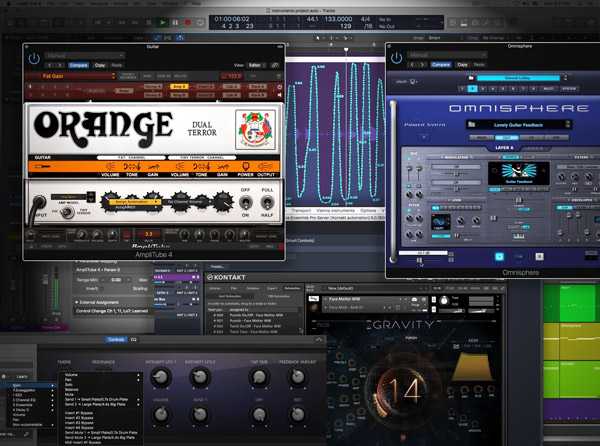
    Logic Pro X guru Doug Zangar shows you how to map and control your 3rd Party plug-ins in Logic Pro X! Sometimes 3rd party plug-ins don’t behave when trying to map and control them in Logic Pro X, so Doug shows you all the tricks and work arounds, enabling complete control over all of your cool AU plug-ins and virtual instruments! Doug begins by welcoming you and lays out what you’ll be learning and accomplishing together in the series, followed by an overview of Logic Pro X’s Smart Controls and Auto Assign features. Next, Doug jumps right in and shows you how to map and control 3rd Party plug-ins KONTAKT, Amplitube, Vienna Ensemble Pro, and Omnisphere, and how each poses a specific issue when trying to automate them. You’ll then be able to map and control virtually ANY 3rd Party AU plug-in in LPX. Moving on, you’ll then explore MIDI Controller Parameters and Set Up, how to be consistent when Mapping for quick and easy use, manual mapping for unparalleled control and performance, mapping external controllers to Smart Controls, automating, using Expression Pedals and more!


    Viewed 13999 By Music Producers & DJ´s.


MaGeSY TeleGram Subscribe & Stay up to date with all the Posts that are published in MaGeSY MaGeSY Podcast: Subscribe & Stay up to date with all the Audio Posts that are published in MaGeSY MaGeSY Instagram Official MaGeSY-Youtube Official MaGeSY-X Official MaGeSY-Facebook Official Social Networks:MaGeSY-Pinterest Official MaGeSY-WhatsApp Channel Official  MaGeSY-TiK-TOK Channel Official

Total Posts: ❨ 🎵➡3 ❩ | Paged: ➡ 0


ಮ್ಯಾಜೆಸ್ಯ್