JavaScript disabled

This website requires JavaScript to function properly.
Please enable it in your browser and reload the page.

Download SYNTHiC4TE | MaGeSY ®™⭐
🎵 MaGeSY® R-EVOLUTiON™⭐⭐⭐

  • image

    How To Make 1001 Nights TUTORiAL

    SYNTHiC4TE | June 08 2017 | 1.72 GB

    Often referred to as a leader of the Progressive House scene, his Perspectives Radio Show and podcast reaches tens of thousands of listeners every month. In this course, he shows us How To Make ‘One Thousand and One Nights’ from his ‘No Regrets’ mini-album Aimed at producers of all abilities from beginners to those wanting to take their skillz to the next level, Darin takes us step by step through the production process showing us how he creates the first beat and groove to mixing and mastering, giving us a real insight into the fundamental techniques and methods he’s discovered while rising up the ranks and instilling his name in the Progressive House scene.


    Viewed 5142 By Music Producers & DJ´s.


  • image

    High End VS Stock Plugins TUTORiAL

    SYNTHiC4TE | June 04 2017 | 1.93 GB

    Veteran dance music producer in-depth course in Mixing and Mastering. Using stems from ‘Back To The Flow’, a track he released under his ‘Maverick’ guise, Ian shares the techniques he’s fine-tuned over the 25 years he’s been producing hit records. Throughout this tutorial, Ian uses both high-end plugins that emulate classic hardware used in professional studios, along with Logic Pro’s own stock plugins – similar to those found in any DAW, to give us a masterclass in achieving perfect end results whether you’re on a budget or not. With tips on how to fine tune the compression, eq, panning, stereo spread and everything in between, this course demonstrates all the tools you can use (both expensive and the more accessible) to help your tracks shine and prepare them for both a club environment and an online release.


    Viewed 4764 By Music Producers & DJ´s.


  • image

    Know-How Ideas View MASCHiNE TUTORiAL

    SYNTHiC4TE | June 04 2017 | 170 MB

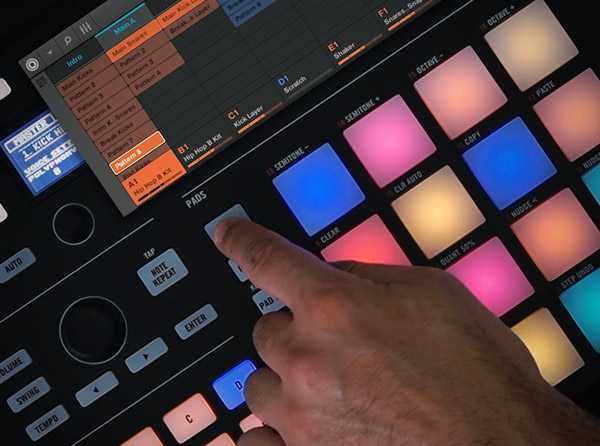
    MASCHINE expert reveals MASCHINE’s new “Ideas View”, which allows you to organize and trigger Scenes for both live or studio use, quickly and artistically! Sami begins by welcoming you and going over exactly what the new “Ideas View” is and how it works. He then goes deeper, showing you how to utilize it creatively in the Arrange View. Next, Sami shows you cool ways to trigger your Scenes with MIDI, via your keyboard, the piano roll in your DAW, or the MASCHINE hardware itself. If you want to know all about MASCHINE’s new Ideas View and how to use it imaginatively, look no further… Watch “MASCHINE Know-How: Ideas View” today!


    Viewed 4273 By Music Producers & DJ´s.


  • Helios KONTAKT-SYNTHiC4TE
    June 2nd, 2017 ⚡
    Categories:

    image

    Helios KONTAKT

    SYNTHiC4TE | June 02 2017 | 3.36 GB

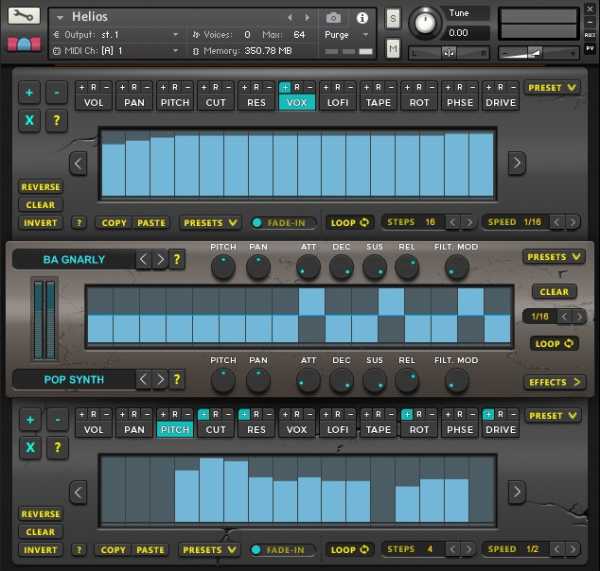
    Helios is an incredibly advanced instrument for Kontakt. Combine two sound sources and rhythmically swap between each sound or create rich evolving soundscapes with gradual modulation. Each channel has an additional 11 individual sequencers which can all be synced to different speeds to control a rich collection of effects in either a pulsed or blendable system. That’s just the start! On the second page is yet another set of sequencers which control master effects and 60 beautiful, custom-made impulse responses to further colour your sounds. Each sequencer has advanced controls which allow you to change the speed, number of steps, direction, offset, fade-in, nudge and loop individually per sequencer. Each sequencer also has copy/paste functions, randomisation and built-in presets.


    Viewed 3810 By Music Producers & DJ´s.


  • image

    Morphzilla v2.0 KONTAKT

    SYNTHiC4TE | June 02 2017 | 631 MB

    Morphzilla is a dual layer morphing tool for Kontakt 5 with a wide range of sounds including monstrous textured drones, evolving pads, ghostly atmospheres, impacts to complex, microscopic sound design elements. You can also add your own samples.  Version 2.0 includes a Sequencer (upto 64 step) and Effects page including Distortion, Tape Saturator, Compressor, Delay & Reverb Combine, twist, sculpt and morph this unique library and create your own sonic patches. Includes dusty pads, nasty impacts, beautiful textured soundscapes and delicate sound design elements. Edit the sample start of each sound, reverse and morph the samples in each menu independently, then combine and crossfade these using the modulation wheel. Use the sequencer to create unique patterns for delicate underscores & glitchy rhythms. Paired with the dedicated effects page and the versatile main page provides numerous options to create your own unique sound palettes. One patch and 2 sample menus holding 302 unique, organically cultivated and beautifully hand-crafted sounds. You can also add your own samples to the user samples groups.


    Viewed 5539 By Music Producers & DJ´s.


  • CAGE Brass KONTAKT-SYNTHiC4TE
    June 1st, 2017 ⚡
    Categories:

    image

    CAGE Brass KONTAKT

    Team SYNTHiC4TE | Feb 02 2015 | 10.5 GB

    The CAGE Brass Edition contains an articulation list second to none. We wanted to create something definitive and unrivaled. The Brass Edition alone contains over 2.200 different FX articulations and it is near impossible to find an effect not covered. The incredible depth of articulations is supported by our custom CAGE Chaos Engine, which contains over 80.000 lines of code. The CAGE Chaos Engine allows you to take complete control of the samples and you can control over 1.500 sample parameters with a single click. In addition you can also randomize all the rack-fx (ex. trance-gate, filters, EQ). So imagine having the deepest set of articulations with an incredibly intuitive and powerful Chaos Engine. An infinity of possibilities. The entire user-interface (UI) was designed in gorgeous 3D and in a way that allows both newcomers and experts to get rolling in a matter of seconds. CAGE is using a variety of components from our exclusive V8P series and contains over 80.000 lines of code giving you the ultimate flexibility and playability. One example is the ability to make round robin chains between different articulations, so you can build your own sets of FX chains.


    Viewed 5619 By Music Producers & DJ´s.


  • image

    M-S Processing in Logic Pro TUTORiAL

    SYNTHiC4TE | May 30 2017 | 142 MB

    The new Dual Mono & Mid/Side options introduced in Apple’s Logic Pro X 10.3 open up a whole new world of mixing possibilities. Join audio expert in this highly focussed FastTrack™ course, and learn everything about M/S processing in Logic. Mid/Side processing is an extremely useful tool, but it can be difficult to understand. But fear not! Our in-house audio expert and Logic trainer Joe Albano is here to show you, in very simple terms, every aspect of this powerful mixing and mastering technique. Joe starts by covering the history, background and technical basics of M/S processing and recording. You learn the fundamentals of stereo: how panning works, different stereo miking techniques, etc. Then, you dive into Logic’s new Dual Mode and M/S options. You see exactly how M/S encoding works, and how you can use it to tweak the stereo image of your audio mixes. You discover how to improve the stereo width of your tracks by EQing and compressing the Mid and Side channels independently. Joe then gives you examples of Mid/Side processing on drums, instruments, vocals, and on a full stereo mix. You even learn how Mid/Side is used for mastering vinyls.


    Viewed 4294 By Music Producers & DJ´s.


MaGeSY TeleGram Subscribe & Stay up to date with all the Posts that are published in MaGeSY MaGeSY Podcast: Subscribe & Stay up to date with all the Audio Posts that are published in MaGeSY MaGeSY Instagram Official MaGeSY-Youtube Official MaGeSY-X Official MaGeSY-Facebook Official Social Networks:MaGeSY-Pinterest Official MaGeSY-WhatsApp Channel Official  MaGeSY-TiK-TOK Channel Official

Total Posts: ❨ 🎵➡1904 ❩ | Paged: ➡ 162


ಮ್ಯಾಜೆಸ್ಯ್