

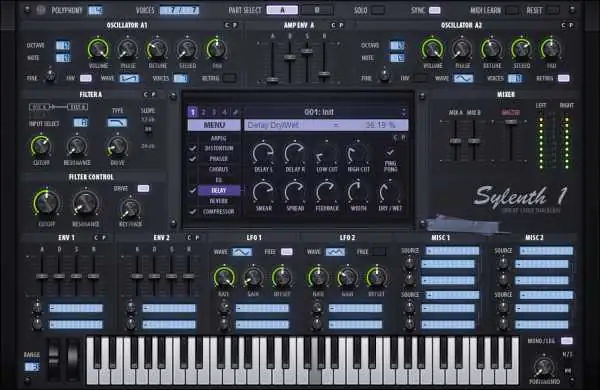
Sylenth1 v2.2.1.1 Bundle WiN
Army of Ninjas | 25.05.2017 | 26.9 MB
(8 Skins | 1483 Soundsets)
Army of Ninjas Sylenth1 v2.2.1.1 Bundle Contains:
INSTALLER CONTENTS:
– User-Selected DLL file
– License.dat file
– MidiLearn.dat file
– Soundbank Collection (1483/FXB Format)
– Skinned DLL Files (x86 & x64)
– Manual (English).pdf
– ReadMe.txtSkins:
– Default v2.2.1 (x86 & x64)
– Black Pearl v2.2.1 (x86 & x64)
– It v2.2.1 (x86 & x64)
– Mopho Blue v2.2.1 (x86 & x64)
– Mopho Yellow v2.2.1 (x86 & x64)
– Sylenth3 v2.2.1 (x86 & x64)
– Retro (x86 & x64)
– Pearl Org (x86 & x64)Sylenth1 v2.2.1.1 Bundle WiN
♪ Download ♪
159836 ViewsRelated Articles:



6 Comments
 Submit a Comment or Report Broken Links:
Submit a Comment or Report Broken Links:

🎹💻🥇🔊🎶🌏🎼❤️🔥
-
 Essentials Stash 2025 (Multi-Kit) MULTiFORMAT-FANTASTiC HOT 🔥✯Essentials Stash 2025✯ FANTASTiC | 18 October 2025 | 967 MB SERUM2 PRESETS, ANALOG LABS, PORTAL PRESETS, DRUMS,…
 -
 Ableton Live 12 Suite v12.4.6 FiNAL macOS-HCiSO HOT 🔥Ableton Live 12 FiNAL U2B macOS TEAM HCiSO | 17 September 2026 | U2B: 5.45 GB Ableton Live…
 -
 DISTRICT XEO v1.0.0 EXPANSiON DVDR-SYNTHiC4TE HOT 🔥DISTRICT XEO v1.0.0 EXPANSiON SYNTHiC4TE/PiGEON3 | 2018/2026 | NI: 851 MB | MPC: 360MB BATTERY / MASCHiNE /…
 -
 Ableton Live 12 Suite v12.4.6 FiNAL WiN-ADWZAbleton Live 12 FiNAL ADWZ | 16 September 2026 | 4.4GB Ableton Live is fast, fluid and flexible…
 -
 Omnisphere v3.0.2c WiN-R2ROmnisphere v3.0.2c WiN Team R2R | 16.09.2026 | PLUGiN:50.1MB | LiBRARY: 57GB PLATFORM: STANDALONE/VSTi/VST3i/AAX* –> (Added PTCH LiBRARY)…
 -
 TH-U Premium v2.1.0 WiN-R2RTH-U Premium v2.1.0 WiN Team R2R | 16 September 2026 | 448.78MB ..: AAX*, VST3, VST2, STANDALONE :..…
 -
 Beat Issue 238 November 2025 PDFBeat Issue 238 November 2025 English/German | 17 October 2025 | PDF | 91.9 MB (English and German…



⚠️ TRY BEFORE BUY - If you like it, support the developer.
ಮ್ಯಾಜೆಸ್ಯ್



16 February 2026 / 18:47
Password secured
16 February 2026 / 19:35
23 April 2026 / 3:26
HOLA,LOS BANCOS DE SONIDOS NO ME QUEDAN GUARDADOS DESPUES DE CARGARLOS
23 April 2026 / 6:11
Has utilizado el Menu interno del PLugin?
https://i.imgur.com/HCWcPxy.png
yo creo que para que se te guarden tienes que usar ese menu y guardar el preset en alguna carpeta de Windows que no está protegida contra la escritura!
25 July 2026 / 0:50
Hi, i don’t understand how to install, can you please explain?
25 July 2026 / 1:21
It’s easy, just run the installer and install Sylenth with the skin you want. It’s all part of the same Sylenth installer. Run the installer and choose your x86 version for x86 DAW programs like Cubase x86, or the x64 version which is for most modern DAWs.