

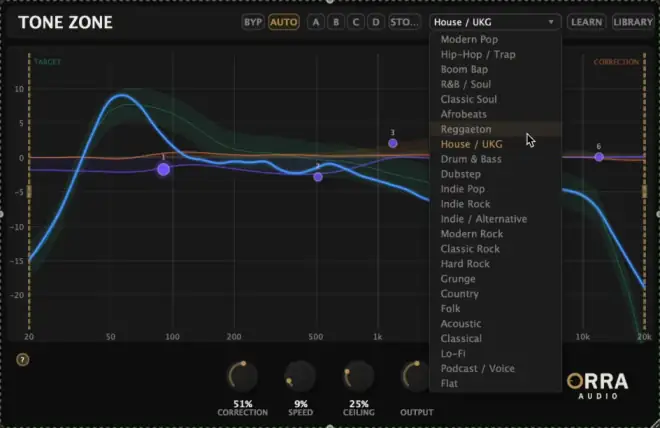
Orra Tone Zone v1.1.31 WiN
MOCHA | 22 April 2026 | 4.7 MB
Tonal Curve Corrector
Analyze, correct, and sculpt your tonal curve in one plugin. See where your mix sits against professional targets and fine-tune with a full parametric EQ and per-band saturation.
Features:
* 40-band spectral analysis with smooth tonal curve display
* 24 genre target curves calibrated from professional masters
* Reference track learning from any audio file
* FFT-based auto-corrective EQ with level-aware processing
* 6-band parametric EQ overlay with draggable nodes
* Per-band analog saturation: Tube, VCA, British
* A/B/C/D comparison — four slots for fast settings auditioning
* Auto Correction Toggle — Disable tonal correction while maintaining consistent latency for reliable PDC on any track
* Internal Bypass (BYP) — clean crossfade bypass with analysis always live
* Fine Control — Shift+scroll for precise Q, Shift+drag for fine frequency/gainKeep your tonal curve in the zone
Not just a meter.
Most tonal analysis tools stop at showing you the problem. Tone Zone goes further — it analyzes, corrects, and lets you fine-tune by hand, all in the same window without switching plugins.Traditional Approach
Open a metering plugin to see your tonal curve. Spot the issues. Switch to a separate EQ to make corrections. Flip back to the meter to check your work. Repeat until it looks right — or until you run out of patience.
See the problem in one plugin, fix it in another.The Orra Way
See your tonal curve against a genre target. Turn up the correction knob and the FFT-based EQ nudges your spectrum toward the target automatically. Then fine-tune with a 6-band parametric EQ and add per-band saturation — all in the same window, all updating in real time.
Analyze, correct, and sculpt without ever switching plugins.
This plugin is Pay What You Want (FREE/PWYW), but still need a license key.
INFO/DEMO/BUY: https://mage.si/orra-tone-zone
Orra Tone Zone v1.1.31 AAX VST3 x64 WiN-MOCHA
♪ Download ♪
2119 ViewsRelated Articles:




🎹💻🥇🔊🎶🌏🎼❤️🔥



ಮ್ಯಾಜೆಸ್ಯ್


