

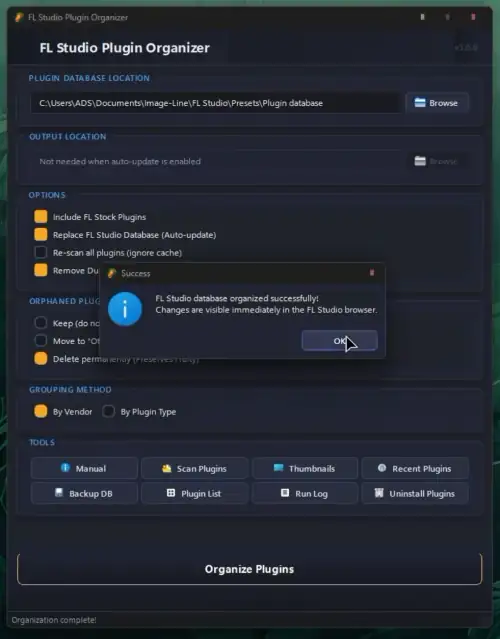
FL Studio Plugin Organizer
P2P | 06 July 2026 | 36.6 MB
FL Studio Plugin Organizer is a Windows app that automatically cleans up and sorts your FL Studio plugin browser — no more scrolling through a chaotic list of hundreds of plugins. It organizes everything neatly into folders by vendor or plugin type, shows up instantly in FL Studio, and now comes packed with powerful new tools to manage your entire plugin collection.
🆕 WHAT’S NEW IN v3.1
📁 Custom Groups Workspace — create your own named plugin folders and drag any plugin into them from the built-in browser. Custom groups always take priority over automated Vendor/Type sorting, so your curated layout is never overwritten on subsequent Organize runs. Groups — including empty ones — are saved instantly and shown in the workspace summary strip so you always know what’s registered.
🔀 Auto-share Variants — when a plugin exists in both a custom group and matches an automated rule, the organizer automatically places a copy in each relevant folder. This means a plugin like Serum can live in your Favorites custom group and inside the standard Xfer vendor folder at the same time — no manual duplication needed.
↩️ Restore Backup — every Organize Plugins run now takes an automatic safety backup first. Click Restore Backup (Ctrl+Shift+B) any time to undo a run, or browse to any backup zip you saved manually.
📤 Import / Export Custom Groups — the Custom Groups Workspace now has Export… and Import… buttons to save your groups and rules as a shareable .json file — handy after a reinstall or on a second machine.
✏️ Rename Folder — right-click any custom group to rename it, or use the new Rename Folder… button in the Workspace to rename any category folder on disk (including auto-sorted vendor folders).
ℹ️ Plugin Info Panel — the Smart Uninstaller’s detail pane now shows format, install date, total size, and binary path(s) for every plugin at a glance — no need to start an uninstall just to check.
⧉ Duplicate Format Detector — plugins installed in more than one format (e.g. a legacy VST2 alongside VST3) are flagged in the uninstaller tree and detail panel, with a dedicated Issues filter to find them all at once.
⚠ Missing Binary Warning — plugins whose .nfo entry no longer has a matching binary on disk are highlighted in red, so you know exactly what’s stale.
🧺 Batch Uninstall Queue — selecting multiple plugins for removal now opens a review queue where you can drop individual items before committing, instead of a single text confirmation box.
🕘 Uninstall History — a permanent log of every plugin removed and when, separate from the per-run debug log. Open it from the main window or from inside the Smart Uninstaller.
⌨️ Keyboard Shortcuts — Ctrl+O Organize, Ctrl+B Backup DB, Ctrl+Shift+B Restore Backup, Ctrl+U Uninstaller, Ctrl+G Custom Groups, Ctrl+L Run Log, F1 Manual.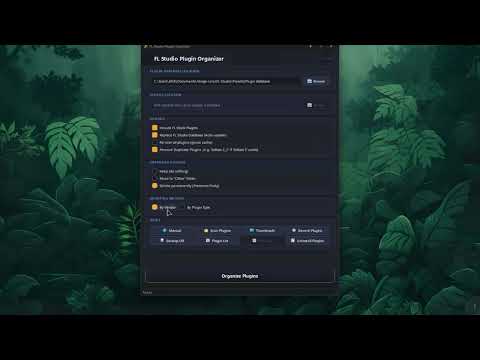
FL Studio Plugin Organizer v3.1 WiN
♪ Download ♪
48 ViewsRelated Articles:






🎹💻🥇🔊🎶🌏🎼❤️🔥
-
 MacDrive Pro v12.0.1 WiN CE-V.R HOT 🔥MacDrive Pro v12.0.1 WiN Team V.R | 06 July 2026 | 9.29 MB MacDrive Pro is an application…
 -
 Cinematic Patterns MiDi-FANTASTiC HOT 🔥Cinematic Patterns MiDi FANTASTiC | 05 December 2025 | 0.7 MB This isn’t your regular set of grooves…
 -
 Flutes And Keys WAV-FANTASTiC HOT 🔥Flutes & Keys FANTASTiC | 04 February 2026 | 59.99 MB Flutes&Keys is a collection of 20 samples…
 -
 Formantic KONTAKTFormantic KONTAKT TeamViP | 04 February 2026 | 1.06GB PERSONAL + EMOTIONAL A solo voice that can fill…
 -
 LII-Flanger v1.0.1 VST3 x64 WiN-SEnkiLII-Flanger v1.0.1 WiN SEnki | 04 February 2026 | 6.0 MB Vintage-Style Flanger Experience the unmistakable character of…
 -
 Mood Reel v1.5 For Ableton Live 12 ALPMood Reel v1.5 ALP ARTiCSTORM | 05 August 2025 | 2.48 GB Set the scene with a collection…
 -
 The Beats of New Orleans MiDi-FANTASTiCThe Beats of New Orleans MiDi FANTASTiC | 05 December 2025 | 0.4 MB Traditional New Orleans music…


ಮ್ಯಾಜೆಸ್ಯ್