

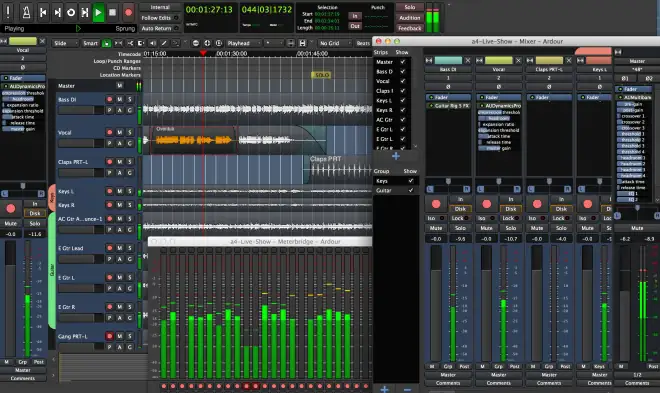
Ardour v9.2.0 DAW
P2P | 25 February 2026 | ~197 MB
Ardour digital audio workstation is a powerful multitrack midi and video software . It was first created as a free DAW for linux based users. It it now available for windows , OSX-mac & linux x86 & 64 bit. Please read below for all the powerful tools available to you in ARDOUR Video/Audio DAW.
• Audio Engineers
Ardour’s core user group: people who want to record, edit, mix and master audio and MIDI projects. When you need complete control over your tools, when the limitations of other designs get in the way, when you plan to spend hours or days working on a session, Ardour is there to make things work the way you want them to.• Musicians
Being the best tool to record talented performers on actual instruments has always been a top priority for Ardour. Rather than being focused on electronic and pop music idioms, Ardour steps out
of the way to encourage the creative process to remain where it always has been: a musician playing a carefully designed and well built instrument.• Soundtrack Editors
Sample accurate sync and shared transport control with video playback tools allows Ardour to provide a fast and natural environment for creating and editing soundtracks for film and video projects.• Composers
Arrange audio and MIDI using the same tools and same workflow. Use external hardware synthesizers or software instruments as sound sources. From sound design to electro-acoustic composition to dense multitrack MIDI editing, Ardour can help.• Audio and MIDI Multi-Track Recording and Editing
Any number of tracks and busses. Non-linear editing. Non-destructive (and destructive!) recording. Any bit depth, any sample rate. Dozens of file formats.• Plugins with Full Sample Accurate Automation
AudioUnit, LV2, LinuxVST and LADSPA formats. FX plugins. Software instruments. MIDI processors. Automate any parameters. Physically manipulate them via control surfaces. Distribute processing across as many (or as few) cores as you want.• Transport Sync and External Control Surfaces
Best-in-industry sync to MIDI timecode and LTC. Send and receive MIDI Machine Control. Sync with JACK transport and MIDI clock. Dedicated Mackie Control protocol support, pre-defined mappings for many MIDI controllers plus dynamic MIDI learn. Use OSC to drive almost any operation in Ardour.• Powerful Anywhere-to-Anywhere Signal Routing
Complex signal flows are simple and elegant. Inputs and outputs connect to your hardware and/or other applications. Use sends, inserts and returns freely. Connections can be one-to-many, many-to-one or many-to many. Tap signal flows at any point. If you can’t connect in the way you want with Ardour, it probably can’t be done.• Video Timeline
Import a single video and optionally extract the soundtrack from it. Display a frame-by-frame (thumbnail) timeline of the video. Use a Video monitor window, or full-screen display, of the imported video in sync with any of the available ardour timecode sources. Lock audio-regions to the video: Move audio-regions with the video at video-frame granularity. Export the video, cut start/end, add blank frames and/or mux it with the soundtrack of the current-session.New Features in 9.2
– MIDI note chase
– MIDI Note DuplicationImprovements in 9.2
– Multiple regions can be now dragged simultaneously from the sources list into the editor.
– Zoom-to-session will now do something more sensible if used while recording in a new, empty session.
– Show pitchbend as a value in the range -8192..8191 rather than 0..16384.
– MIDI CC lanes/tracks names make it easier to identify the channel and controller.
– Small additions to preferences meta-data making it easier to search for some preference items.
– Auto-return icon now more consistent with other icons.
– The “normal” process for MIDI learn of cue triggering (Ctrl/Cmd-middle button) is now available, along with a button in the Preferences dialog to clear all current custom cue MIDI bindings. Remember that you will need to set the cue trigger input port in Preferences before using this. The menu-driven version (and “unlearn” operation) are still available.
– Two mono audio files can be merged into a single stereo track using drag-n-drop: create a stereo track, select two mono regions (same length) from the source list and drag to the track. This will also work with more than 2 files, as long as the files are all the same length and the number of them matches the channel count of the target track.
– When recording MIDI cues, notes that were held down before recording starts will have the correct velocity values associated with them.
– Reduce the number of redundant transport locates during startup.
– And bug fixes.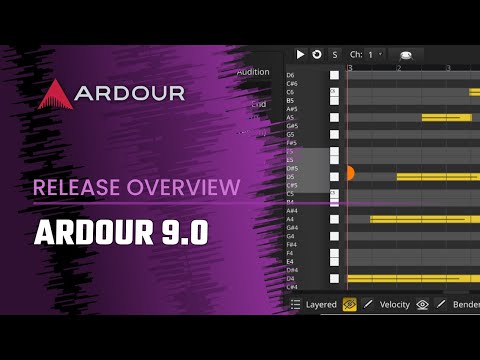
Ardour’s source code is free, but the precompiled, ready-to-use program requires payment. Please consider supporting the developer if you decide to use it.
INFO/DEMO/BUY: https://mage.si/ardour
Ardour v5.4.0 DAW WiN OSX LiNUX RETAiL-0TH3Rside
♪ Download ♪
14128 ViewsRelated Articles:

🎹💻🥇🔊🎶🌏🎼❤️🔥

ಮ್ಯಾಜೆಸ್ಯ್


