

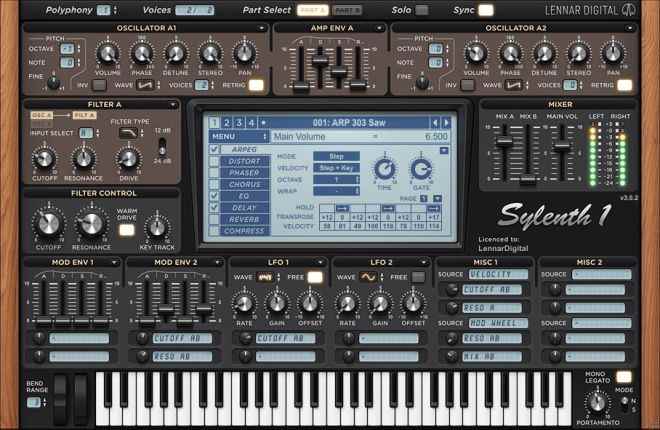
Sylenth1 v3.0.75 WiN
Team R2R | 13 May 2026 | 71.55 MB
PLATFORM: VSTi/VST3/AAX(MOD)/x64
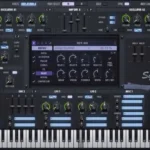
Sylenth1 is a virtual analog VSTi synthesizer that takes the definitions of quality and performance to a higher level. Until now only very few software synthesizers have been able to stand up to the sound quality standards of hardware synths. Sylenth1 is one that does. Sylenth1 is not just another synth. It was built from a producer’s point of view. It was built to produce superior quality sound and music. It was built to perform. A lot of research has been invested in order to achieve unheard warmth and clarity. The graphical interface ensures the highest level of usability so you can fully unleash your creativity.
FiXED:
Previous keygen has problem in validating Activate.dat. The validator was made for old developing version of R2R System (v0.x.x). A witch also updated the wrapper to block the network connection. Please report if you find another issue.If you want to remove previous license :
%PUBLIC%\Documents\LennarDigital\Sylenth1\Config\License.dat
——————————————————————————
A witch says,
v3.075 fixes the wrong debugger detection from VMProtect. To solve that non working detection, Lennard stopped hokking NTDLL’s Nt/ZwProtectVirtualMemory which we explained in the previous NFO. Thanks for proving we said truth :) This is not first or second time for LennarDigital having problem with their “strong” protection. It has always happened, right from the V1. Legit users should ask Lennard to remove those nonsense. At least it protects nothing since 2022 :)INFO/DEMO/BUY: https://mage.si/sylenth1
Sylenth1 v3.0.75 WiN FiXED-R2R
♪ Download ♪
426760 ViewsRelated Articles:

 Submit a Comment or Report Broken Links:
🎹💻🥇🔊🎶🌏🎼❤️🔥
-
 AK476 v1.0.2 AAX AU VST3 64Bit macOS-MORiA HOT 🔥AK476 v1.0.2 MAC MORiA | 11 July 2025 | 67.07 MB AK-476 The legendary FET compression Based on…
 -
 Mad Max WAV MiDi-FANTASTiC HOT 🔥Mad Max WAV MiDi FANTASTiC | 04 July 2024 | 133.93 MB ‘Mad Max’ comes with 5 Trap…
 -
 Mr. Hector Suite v1.0.0 U2B macOS-MORiA HOT 🔥Mr. Hector Suite v1.0.0 MAC MORiA | 11 July 2025 | 1.39GB ..: AAX*, AU, STANDALONE, VST3, 64Bit…
 -
 Motion Graphics WAV-FANTASTiCMotion Graphics FANTASTiC | 27 September 2025 | 2.1 GB If you’re in the process of creating a…
 -
 KiCK Presets Collection KiCK 1,2,3-GTAKiCK Presets Collection GTA | 13 May 2025 | 259.92MB 9 Packs of Presets for KiCK 1,2,3
 -
 Future Roots Anthems MULTiFORMAT-FANTASTiCFuture Roots Anthems FANTASTiC | 27 July 2025 | 516.98 MB ‘Future Roots Anthems’ is a dynamic collection…
 -
 FFT with Reaktor TUTORiALFFT with Reaktor TUTORiAL SYNTHiC4TE | 01 April 2015 | 167 MB Learn FFT with REAKTOR. Manipulate sound…



ಮ್ಯಾಜೆಸ್ಯ್



4 May 2026 / 14:01
Hi All,
Any issue encountered with new activation method? It doesn’t work for me: I’m getting “Invalid Activate.dat file!”, but the file is accepted by the method from V3.073 (the file generated by V3.073’s method is acknowledged by V3.075 inst but new run asks validation again)
4 May 2026 / 14:37
Here’s something very important… follow the R2R steps, but… there was a small correction missing in the hosts:
REVISE NEW:
https://justpaste.it/novki
Above all, you have to block internet access to activate it… and then everything’s fine… drag the license into the plugin and perfect! I just did it now:
https://i.imgur.com/pDzenly.png
7 May 2026 / 20:25
Thanks a lot for the update, stil, I’ve followed thoroughly each step file is generated in default location or in a test folder on local drive, but the witch wand tool still complains about “Invalid Activate.dat file!”. I’ve made the test with various serial code and name but result is still the same: after 1s or so the witch wand ends up with the message “Invalid Activate.dat file!”, and no file answer file is being generated. I’ve even tried without antivirus in the case of.
BUT
I’ve tried on my old laptop with the same initial conditions (local test folder) and it worked.
The I’ve tried to get the reg key from my laptop generate file on Win11 computer and generate the License but I get same message from the witch wand: “Invalid Activate.dat file!”.
I suppose that for some reason the generated file from Sylenth is corrupted…
Computers at stake:
– Computer NOK Win11,
– Computer OK Win10
I know this is a bit long, would I be the only one to have reported such an issue?
Thanks in advance for any feedback!
7 May 2026 / 21:33
My first thought is that Windows Defender in Windows 11 might be blocking the R2R System keygen in Witchwand format. We don’t actually use Windows 11, only Windows 10. Or perhaps you have some Windows 11 protection enabled that’s preventing you from running the process R2R System uses for activation. Or maybe it’s blocked a necessary .exe file located in this folder:
C:\Program Files\TEAM R2R\R2R System
Make sure all the .exe files in that folder are whitelisted and not quarantined. If even one of those .exe files is quarantined or blocked by the system, the license process won’t work properly. Check it! It should really look like this:
https://i.imgur.com/TIYC7m2.png
With all its icons and sizes!
8 May 2026 / 15:16
Every tools from R2R are up to date and running: I’ve been using successfully them for some other software.
The problem seems to come from the file generated by the sylenth1, when I use R2R tool on my old laptop with the file generated on my win11 comp, the R2R tool (that ran well on win10 with the file generated on win10) claims as well “Invalid Activate.dat file!”.
I’ve uninstalled both tools and the sylenth, reinstalled with fresh downloads with the same sad result on win11.
All in all, it’s not such a big deal the previous version of the sylenth with its R2R KGN is fine, I’m wondering whether I’m an isolated case, or more global, then specific to win11 (it’s a plague for music softwares genarally speaking: it’s deciding on its own to block some installers because their reputation is unknown).
Thanks a lot for your support!
And Musicians, if you’re facing the same issue, please share, even if magesy will moderate, it will provide a useful feedback!
8 May 2026 / 15:26
It’s possible we’ve overlooked the most important thing, and it’s a bit difficult to do because Windows HOSTS files are often locked, but I think that’s your problem. To edit the Windows HOSTS file, you’ll need to use Notepad++:
https://notepad-plus-plus.org/downloads/
When you open the HOSTS file and save it, it will tell you to reopen it as administrator (Notepad++ does this automatically). Then you can save the changes to the HOSTS file. After that, restart your computer and turn your network adapter off and on again. I’ll leave the final instructions here:
https://justpaste.it/hut7g
Let me know how it goes. If I can do it, you can too. I don’t think Windows 11 will be a problem either.
13 May 2026 / 1:44
It worked fine for me! But look! Here’s the fixed version which I think will solve your problem!
14 May 2026 / 19:53
Thanks for feedback, unfortunately the wirch wand is still unable to understand the file generated by the sylenth with this bloody message “Invalid Activate.dat file!”.
There’s obviously a trick with win11: trying to activate another software, the activation file was generated and then the witch wand generated the answer file, but the generated file was rejected by the software (I forgot which one, sorry for that).
As said, not such a big deal, but there’s a kind of sourcery in win11…
26 July 2026 / 15:28
There’s no keygen with files
26 July 2026 / 16:33
You need to have the following installed:
TEAM R2R System vWiN-R2R
https://www.magesy.blog/?p=303074
and then use: WM_Sylenth1.r2rwm