


Genesis Pro v2.2.1 WiN MAC
Team V.R | 17 October 2026 | WiN: 341MB | MAC: 107MB
⚡ The World’s First GPU-Based Analog Mixing Ecosystem ⚡
AnalogX Genesis – The Heart of Your Studio. Genesis is more than just a plugin – it’s the core of the AnalogX ecosystem. Built to power our High-Quality Modelling Tier, Genesis delivers the warmth, depth, and non-linear behaviour of legendary studio hardware — from vintage consoles and compressors to tape machines and preamps. With Genesis, every expansion pack becomes a new piece of gear in your DAW. Load it, dial in the tone, and bring your mixes to life with authentic analog character.
Why GPU Mixing Changes Everything
– The jump to GPU isn’t just about performance, it’s about possibilities. Here’s what a GPU based Genesis Pro unlocks in your workflow.Real-Time Neural Power
– Run hundreds of AnalogX’s high-quality emulations, or NAM Profiles with minimal CPU drag per instance and super low latency.Hybrid Workflow Freedom
– Switch between CPU and GPU instances at the touch of a button, track on CPU, mix on GPU? – you choose!Analog-Scale Mixing
– Build huge SSL, Neve, and API inspired console setups, complete with tape-style summing chains instantly available right inside your DAW.Creative CPU Headroom
– Let your CPU breathe. Keep your heavy synths, reverbs, and virtual instruments running flawlessly while the GPU handles the heavy lifting.Super-Fast Bounce Times
– Render entire neural sessions much faster with full mix consistency and minimal wait time.System Requirements:
Hardware
Mac
• Apple Silicon M1 / M2 / M3 / M4 / M5 (Pro / Max / Ultra)
• Minimum 16 GB RAM (32 GB Recommended)
• macOS (13.0) or laterNote: Not compatible with ASIO Guard OFF in Cubase or Nuendo on macOS.
Windows
Supported GPUs:
NVIDIA
• RTX 2000 Series
• RTX 3000 Series
• RTX 4000 Series
• RTX 5000 Series
(Minimum 8 GB VRAM)
AMD
• RX 6000 Series
• RX 7000 Series
• RX 9000 Series
(Minimum 8 GB VRAM)Driver Notice:
Please ensure the latest official NVIDIA or AMD drivers are installed directly from the manufacturer’s website. Drivers supplied via Windows Update are not supported.What’s new in Genesis v2.2.1
• NAM A1, A2 Support
• New Analog HQ 2 Modelling
• Neural Oversampling
• CAL input calibration for fast setup
• Dual-action volume matching with LUFS and peak matching
• True Stereo emulation loading
• Full GPU support for Windows and Apple Silicon Mac compatible GPU processing
• Mac Performance & Stability fixes and improvments
• Sweet Spot Input Meter
• Reduced CPU consumptionChangelog v2.2.1 – 14.10.2026
• Added model oversampling (2x / 4x) for neural profiles to reduce aliasing, set per instance and saved with the project
• Fixed the ultrasonic filter used by neural profiles
• Fixed delay compensation when using oversampling
• Fixed auto calibration not being reset when the X2 toggle is changed
• Fixed the GPU indicator lighting up while the instance was running on the CPU
• Fixed the global GPU engine enable/disable behaviour
• Fixed the GPU engine occasionally getting stuck at “Reconfiguring GPU for the new buffer size…” after a buffer-size change
• Fixed a crash on macOS in Logic when closing large sessions
• Fixed the GPU engine failing to install on macOS versions newer than 26
• Improved GPU loading stability with many instances
• Updated the GPU Audio engine to 2.3.0.228 (fixes an engine wedge and a teardown hang)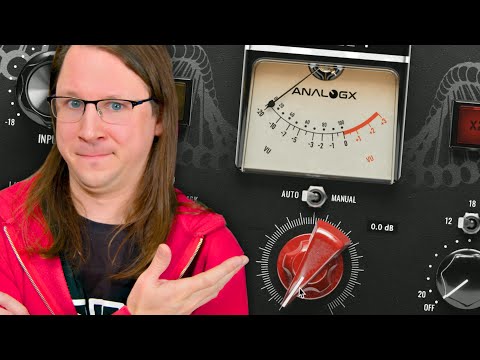
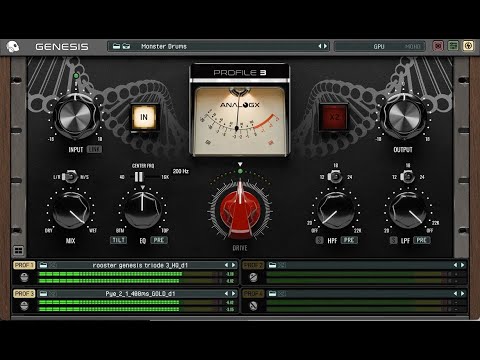
INFO/DEMO/BUY: https://mage.si/GPU
Genesis Pro v2.2.1 AAX AU VST3 x64 WiN MAC-V.R
♪ Download ♪
4734 ViewsRelated Articles:




🎹💻🥇🔊🎶🌏🎼❤️🔥
-
 Archetype: Misha Mansoor X v1.0.1 WiN-R2R HOT 🔥Misha Mansoor X WiN Team R2R | 17 December 2025 | 66.5MB PLATFORM: VST2/VST3/AAX(MODiFiED) The ultimate toolkit for…
 -
 APU Loudness Series v5.7.8 WiN-BLiZZARD HOT 🔥APU Loudness Series WiN Team BLiZZARD | 17 October 2026 | 416.7MB ..: AAX, VST3, STANDALONE, x64, x86…
 -
 Archetype: Nolly X v1.0.2 WiN-R2R HOT 🔥Archetype: Nolly X Team R2R | 17 December 2025 | 75.7MB PLATFORM: VST2/VST3/AAX(MODiFiED) The purest distillation of Nolly’s…
 -
 Roux KONTAKTRoux KONTAKT P2P | 17 October 2024 | 1.5 GB Hyped-up NOLA vibes Step into the sonic melting…
 -
 AGTC v3.7.0 STANDALONE AU VSTi VST3 AAX x64 WiN MAC-R2RAGTC v3.7.0 WiN MAC Team R2R | 30 November 2024 | 3.59GB …::: STANDALONE, AU, VSTi, VST3, AAX,…
 -
 Curvature v2.0.1 WiN MAC LiNUX READ NFO-R2RCurvature v2.0.1 WiN MAC LiNUX Team R2R | 17 October 2025 | 270.2 MB PLATFORM: AU/VST3/AAX(MODiFiED) The Easiest…
 -
 Yamaha Vocalo Changer v1.2.0 For VOCALOiD 6 WiNVocalo Changer For VOCALOiD 6 P2P | 17 June 2025 | 291 MB AI Voice Bank converts and…



ಮ್ಯಾಜೆಸ್ಯ್