

WaveLab Pro 13 WiN
Team V.R | 19 March 2026 | 546.72MB
Your Complete Solution for Stereo and Dolby Atmos Mastering
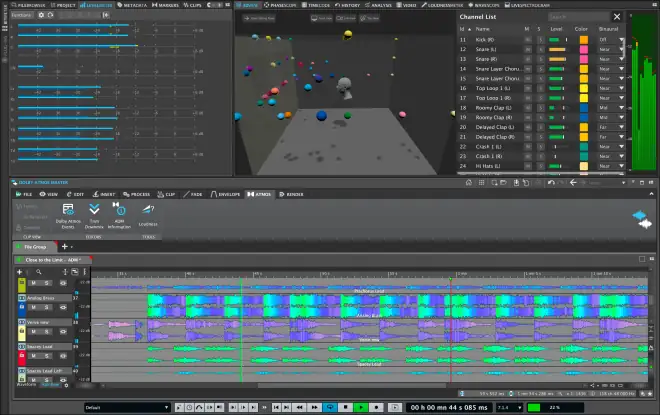
WaveLab 13 introduces Dolby Atmos mastering, with intuitive tools for ADM file editing, loudness control, and album assembly. New plug-ins like MasterRig 2 and Vocal Chain expand creative possibilities, while multicore rendering and streamlined editing features ensure faster, more efficient production for immersive and stereo projects alike.
Dolby Atmos Master Montage
The Master montage makes mastering a single ADM file flexible and efficient. At its core is the innovative Immersive Plug-in Hub, which enables standard VST 3 plug-ins to be inserted across up to 128 audio channels through a single interface. It also allows bed plug-ins like Surround Reverb to be inserted, along with clip and track plug-ins for detailed sound shaping. Full creative control is maximized by customizable sidechain routing and efficient mixdown of all channels. Sample level editing can be performed with WaveLab’s internal tools, while loudness and TruePeak normalization ensure consistent, professional results. A stereo reference track also enables accurate A/B comparison and length alignment of the ADM file with a stereo master.Dolby Atmos Album Montage
The Album montage allows multiple ADM files to be assembled into a single, cohesive album master. They can be sequenced much like a stereo montage, arranged on one or multiple tracks. Clips can be visualized in multiple formats, from stereo through to 9.1.6, with the option to update the display automatically to match the Dolby Atmos Renderer. Loudness and TruePeak normalization ensure accurate levels across multiple ADM files, with options to preserve or adjust differences between them and stereo masters. Stereo reference clips allow easy A/B comparison with the Atmos stream. Compatible ADM files can also be combined into a new file with crossfade support — ideal for live recordings or audiobooks — while multiple ADM files of any type can be merged into one.Multicore Rendering
Full multicore support for Audio Montage elements means WaveLab 13 delivers dramatically faster workflows and unparalleled efficiency for complex projects. Multiple tasks can be processed simultaneously, significantly reducing rendering times. For example, rendering ten titles now takes only 10% of the previously required time, saving hours and allowing more focus on creativity and production quality.Tab Synchronized Playback
Full A/B comparison of audio files and clips is now possible through WaveLab’s powerful multi-tab interface, ensuring a smooth and intuitive workflow. When this option is active, switching to another tab seamlessly continues playback from the same audio position as the previous tab. This is particularly useful for comparing related files, such as different versions of the same project, with precise ease.
Release Notes: https://mage.si/v13
INFO/DEMO/BUY: https://mage.si/wavelab13
WaveLab Pro 13 v13.0.10 WiN-V.R
♪ Download ♪
7711 ViewsRelated Articles:


🎹💻🥇🔊🎶🌏🎼❤️🔥

ಮ್ಯಾಜೆಸ್ಯ್


