

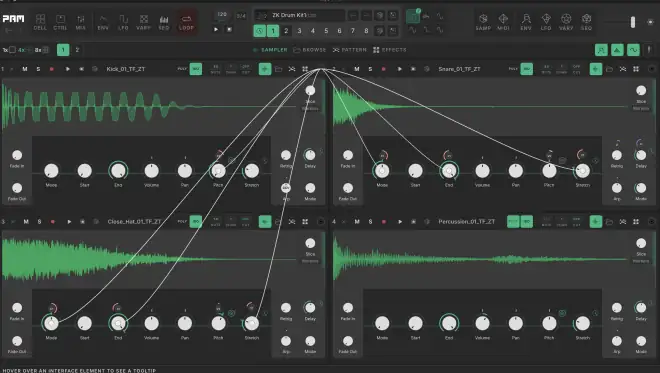
PAM v1.4.53 WiN
Team R2R | 27 May 2026 | 28.3MB | CONTENT: 1.34GB
PAM is an eight-cell creative sampler. Build patterns, stretch and shape samples, and route modulation across cells through LFOs, envelopes, macros, and parameter sequencers. It is available for VST3, AU, CLAP and Standalone for PC and Mac. A Rent-To-Own option is available.
Features:
– Cell Grid: Eight independent cells with samplers, effects, and modulation. Route modulation between cells and build complex signal flows.
– Cell Views: Four views per cell: Sampler controls, Sample Browser, Pattern Editor, and Effects chain. Switch instantly between them.
– CtrlAll: Global macro controls and A/B crossfader. Link parameters across all cells with per-cell exclusions.
– Slicer: Slice samples into segments with automatic transient detection. Sequence slices with the dedicated slice patterns.
– Pattern: Step sequencer with note, pitch, slice, and stretch lanes — plus a piano roll for poly mode. Draw and resize notes across the full pitch range with scale filter and velocity lane.
– Tracker: Tracker-style pattern view across all cells. Program notes, velocity, probability, and retrigger in a vertical timeline.
– Mixer: Mix all eight cells with volume, pan, mute, and solo. Per-cell effects chain with EQ, Filter, Delay, Compressor, and more.
– Looper: Record up to eight tracks with overdub, external input, and drag-and-drop. Save eight variations with bar-synced switching.
– Vary: Per-parameter randomization with adjustable range and probability. Add controlled variation to any knob.
– LFO Modulation: Six global LFOs with multiple shapes and tempo sync. Map to any parameter with depth and bipolar control.
– Envelope Follower: Per-parameter envelope followers with adjustable attack and release. Sidechain from any cell output.
– Randomisation: Generate random signals and setups for specific parts of PAM – randomize all LFOs at once, all envelope followers, all sequencers, and others.
INFO/DEMO/BUY: https://mage.si/mapaudio
PAM v1.4.53 CLAP STANDALONE VST3 x64 WiN-R2R
♪ Download ♪
5927 ViewsRelated Articles:

 Submit a Comment or Report Broken Links:
🎹💻🥇🔊🎶🌏🎼❤️🔥
-
 Cubase Pro 15 v15.0.30 x64 WiN-V.R HOT 🔥Cubase Pro 15 v15.0.30 WiN Team V.R | 03 June 2026 | 965.52MB Added New ★ Yamaha Omnivocal…
 -
Cubase Pro 15 v15.0.30 64Bit macOS-P2P HOT 🔥Cubase Pro 15 v15.0.30 MAC P2P | 03 June 2026 | 1.23GB SHAPE YOUR SOUND. BE UNIQUE. From…
-
 Nuendo 15 v15.0.30 WiN MAC HOT 🔥Nuendo 15 v15.0.30 WiN MAC P2P/V.R | 03.06.2026 | WiN:1.35GB | MAC:1.7GB | CONTENT:20 GB As the most…
 -
 Dorico Pro v6.2.30 x64 WiN-V.RDorico Pro v6.2.30 x64 WiN Team V.R | 03 June 2026 | 618.95MB Dorico is the first choice…
 -
 VO-TT v1.1.0 WiN-SEnkiVO-TT v1.1.0 WiN SEnki | 26 March 2025 | 33.7 MB …: VST, VST3, AAX, x64 :… VO-TT…
 -
 Time Crystals KONTAKTTime Crystals KONTAKT Team ViP | 26 March 2025 | 5.56GB Complexity Made Simple ORIGIN STORY Quartz in…
 -
 C660 Compressor Presets for Nebula UPDATEDC660 Compressor Presets Nebula UPDATED 44.77.59 | 08 May 2016 | 263.5 MB This set is ‘based on’…


ಮ್ಯಾಜೆಸ್ಯ್



30 April 2026 / 20:35
Was wondering way my Daw’s can’t find the dll’s? I installed twice, Standalone,Vst3 and Clap doesn’t work. Please send me info of why it’s not working, or what I need to do for a fix.
30 April 2026 / 20:46
VST3:
C:\Program Files\Common Files\VST3\MAP Audio
CLAP:
C:\Program Files\Common Files\CLAP\MAP Audio
STANDALONE:
C:\Program Files\MAP Audio\PAM
30 April 2026 / 20:53
Was wondering way my Daw’s can’t find the dll’s? I installed twice, Standalone,Vst3 and Clap doesn’t work. Please send me info of why it’s not working, or what to do for a fix. Also, can I “PLEASE” have info for the right way to install the Systems… Say like if PAM used System 1.3.1, but I already have 1.4.0 installed… Would I have to uninstall 1.4.0 for 1.3.1…. As well, when to install Systems, I’m lost, so use to keygens… lol Thanks! Enjoy your Day!
30 April 2026 / 21:04
First, uninstall version v.1.3.1 of R2R and install the latest version v1.4.0, but this is only for activation. If your DAW can’t find the DLLs, that’s a problem with your DAW. Check the paths.
I have System R2R version v1.4.0
It works perfectly… check it out in Cubase 15 Pro… VST3:
https://i.imgur.com/BJw0klw.png