

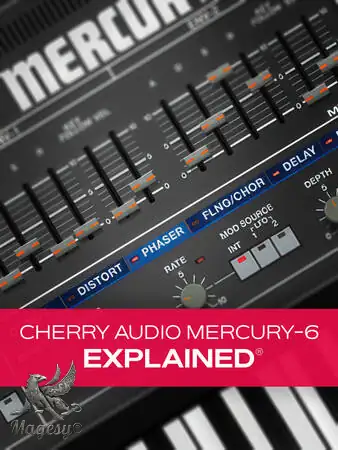
Mercury-6 Explained®
FANTASTiC | 13 January 2026 | 255 MB
Cherry Audio’s Mercury-6 is a modern take on the classic Roland Jupiter-6, combining vintage character with flexible, performance-ready features. In this video course, Stephen O’Connell guides you through everything you need to know to confidently create, shape, and perform sounds with Mercury-6 — whether you’re brand new to the synth or looking to go deeper with its layering and modulation capabilities. These videos are designed for new Mercury-6 users. You’ll begin with a clear overview of the interface, presets, and workflow, learning how to navigate the synth, manage and save sounds, and adjust the UI for focused sound design. From there, Stephen walks you through building sounds from the ground up, covering oscillators, filters, envelopes, and modulation sources like LFOs to add depth, motion, and expression.
As the course progresses, you’ll explore Mercury-6’s dual-voice architecture, learning how to split and layer sounds across the keyboard for more complex performances. You’ll also dive into glide and arpeggiator functions, expressive performance controls, built-in effects, and flexible MIDI mapping—making Mercury-6 a powerful instrument both in the studio and on stage. The course wraps up with a complete preset-building walkthrough that brings all of these concepts together in a real-world workflow.
This Mercury-6 video series is the quickest and easiest way to learn your way around this powerful instrument and start creating your own sounds right away. See the individual Mercury-6 video tutorial descriptions for more information on all that’s covered and how you can implement this synth into your productions in no time. Create expressive, performance-ready sounds and unlock the full potential of Mercury-6 … Watch “Cherry Audio Mercury-6 Explained®” now!
What You Will Learn:
-Navigating the Mercury-6 interface and managing presets efficiently.
-Creating sounds from scratch using oscillators, filters, envelopes, and modulation.
-Working with dual voices, keyboard splits, glide, and arpeggiation.
-Enhancing sounds with performance controls, effects, and MIDI mapping.
-And more!Software Used:
– Logic Pro
– Cherry Audio Mercury-6 SynthINFO/DEMO/BUY: https://mage.si/Mercury6
Mercury-6 Explained TUTORiAL-FANTASTiC
♪ Download ♪
17548 ViewsRelated Articles:


🎹💻🥇🔊🎶🌏🎼❤️🔥

ಮ್ಯಾಜೆಸ್ಯ್


